

¶ GEO-TBI registry Guide
A guide to the Global Epidemiology and Outcomes following Traumatic Brain Injury registry (GEO-TBI) on the Orion platform
Last updated 15 December 2023
See the Data Validator section below for instructions unique to data validators.
¶ Logging-in
Once you have had confirmation that your GEO-TBI access has been configured, log in at: https://orion.net/login and the Dashboard will be displayed.
Please note, registering patients and adding data to eCRFs is not possible until your GEO-TBI Lead has logged in to complete a site questionnaire.
¶ The Dashboard page
At the top of the GEO-TBI Dashboard page are counters for:
- The total number of patients registered globally
- The total number of patients registered at your centre
- The total number of eCRFs completed at your centre in the last 30 days
Below the counters are some shortcut links to get you started, including:
- Enter a new patient on GEO-TBI
- A link to this guide which can be viewed in your browser or downloaded
- View registry submissions and identify gaps
- Review an individual submission and export data
If your institution uses the Orion referral management system Nexus, you will see an additional menu option Screening log, which screens emergency referrals for patients - eligible for the GEO-TBI registry, removing the need to enter patient demographics.
The About GEO-TBI section gives a brief background of the registry. Below the partner logos you can expand a view of the complete GEO-TBI eCRF dataset.
¶ Registering patients
To register a patient, select the + icon in the left-hand menu or the shortcut in the Steps to get started section.
To add an entry for a patient, check whether the patient has already been added to the database. Complete the demographics fields and select Search. Be sure to enter all relevant demographics to avoid errors.
In addition to the UK's NHS and CHI patient identifiers, the demographics section has options to include local institution patient identifiers, where available.
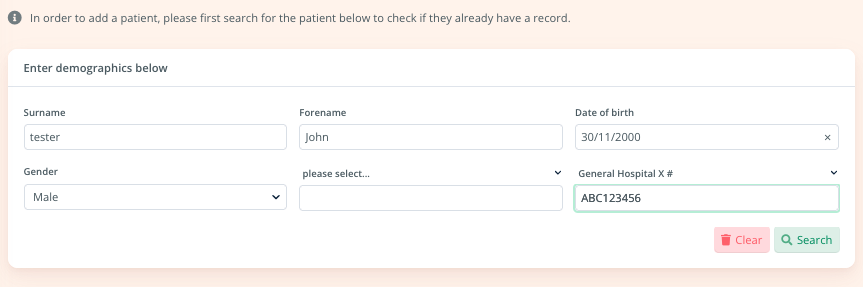
If your institution has chosen to participate in GEO-TBI without using patient demographics, you will be prompted to enter a new patient's sex and year of birth, after which a random Orion GEO-TBI identifier for that patient will be generated.
Tip: Make sure to note the ID in your own records, as this will be the only way to identify the patient and add further data
¶ Searching for registered patients
Load the Tracker to search for previously registered patients by registration date range. From this view, eCRFs can be loaded for completion (see Reviewing and completing eCRFs below)
¶ Reviewing and completing eCRFs
Following registration of a patient, the GEO-TBI registry consists of the following eCRFs:
- Injury (multiple injuries can be added if needed)
- Imaging
- Admission
- Outcomes (30-day post surgery, but additional outcomes may be added)
Load the Pathway Tracker to view all registered patients and their eCRF submission progress. The Tracker can be sorted by column headers, filtered by registration date, and displays all eCRFs on a single row per patient. Clicking on the name or Orion identifier will load the patient record, or clicking on the eCRF ID, Draft icon or + will load the eCRF for review or completion.
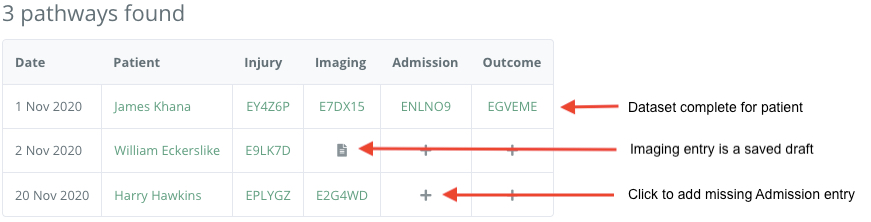
The Pathway tracker is a powerful tool to help you track the completed eCRFs for your patients and the data within.
The start and end dates can be set to search for Pathways created between two dates.
Note that the Pathway Tracker adds all Pathway data on one row per patient, stacking multiple ecRFs into a single row. The table can be sorted by any column by selecting the chevron in the respective column header.
To drill into more detail of each procedure, you may use the Data column feature to show the procedure date, or the Entry search feature.
¶ Custom use of the Tracker
To make full use of the Pathway Tracker features, click the Data columns button:

This shows the default columns to be displayed by the tracker under the heading Metadata, which can be customised to suit the preferred level of detail:
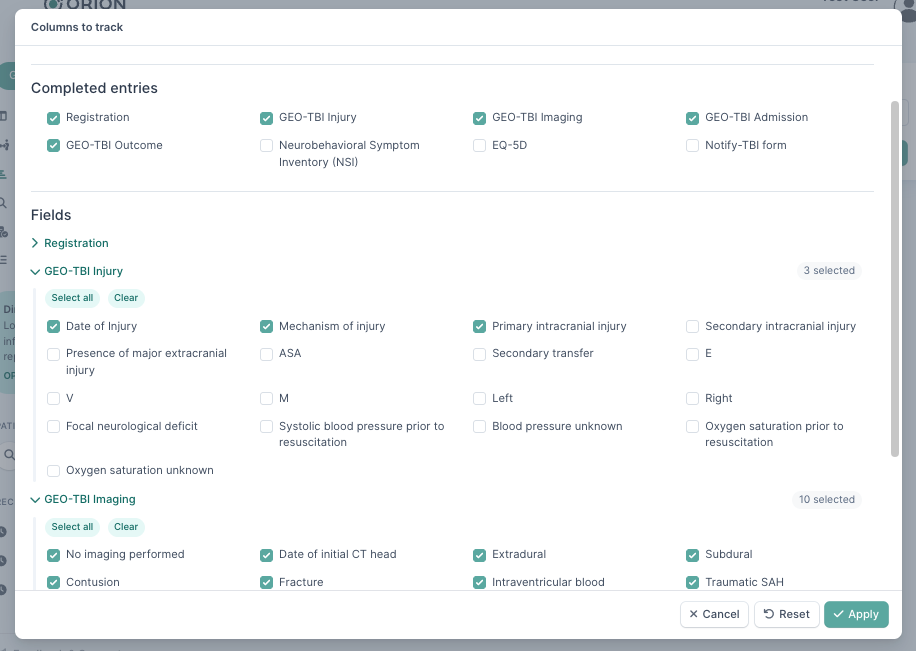
Click the Apply button to apply the fields to the customised search:

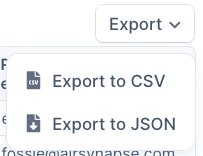
The tracker will now show the selected fields as columns in the tracker output. If necessary the data can then be exported to either a CSV file for further analysis with a spreadsheet program (for example), or as a JSON file.
¶ Entry search
Unlike the Pathway Tracker which searches by pathways, the Entry search performs a flat search of each eCRF. Consequently you may see patients with multiple eCRFs appear more than once in search results.
The Entry search is most suited to export of large samples of data for detailed analysis with third-party spreadsheet or statistical software.
¶ Multiple injury episodes
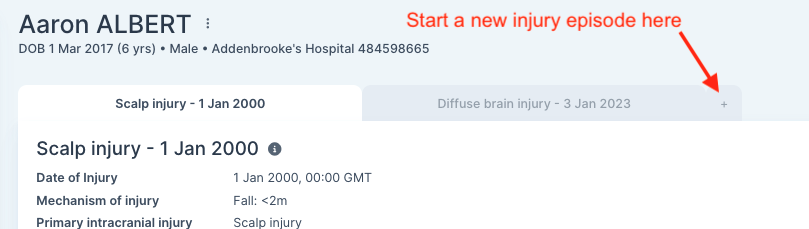
Should a patient present with a new injury, GEO-TBI allows you to start a new episode by completing a new Injury form, with associated Imaging, Admission and Outcome forms. Each injury episode is clearly indicated in a Tab dashboard, showing the date and primary intracranial injury in the header.
¶ Data Validator
To ensure the epidemiological quality of the GEO-TBI data, the local data validator is requested to complete basic information every 3 months using an alternative information source such as hospital records, theatre logbooks or institutional reports.
This information is limited to:
a) The number of admissions due to TBI
b) The number of operations due to TBI
c) Which information source was used
Data validators are blinded to registry data, and are therefore unable to add new patients or use any search options.
If you are both Data Validator and registry user, you are able to easily switch access by changing your profiles in the Sidebar. The Data Validator profile is identified by an icon in the GEO-TBI Profile button.

¶ Snapshot study - GEO-TBI: Incidence
¶ General information
GEO-TBI: Incidence is the first collaborative study to run on the GEO-TBI registry. It is a multi-centre, international, prospective observational study, using the core dataset of the GEO-TBI registry via a snapshot design – all TBI patients admitted to the local hospital during a 90-day window will be included in the study.
The study protocol can be found on the GEO-TBI website
¶ Inclusion period
Local GEO-TBI teams may select any 90-day period until 31st December 2024 as their data input period. From the date of their injury, teams must follow patients up for a minimum of two weeks.
The inclusion period is chosen at any time, by any member of the team, by submitting the Incidence study period Entry via the Study admin option in the sidebar menu.
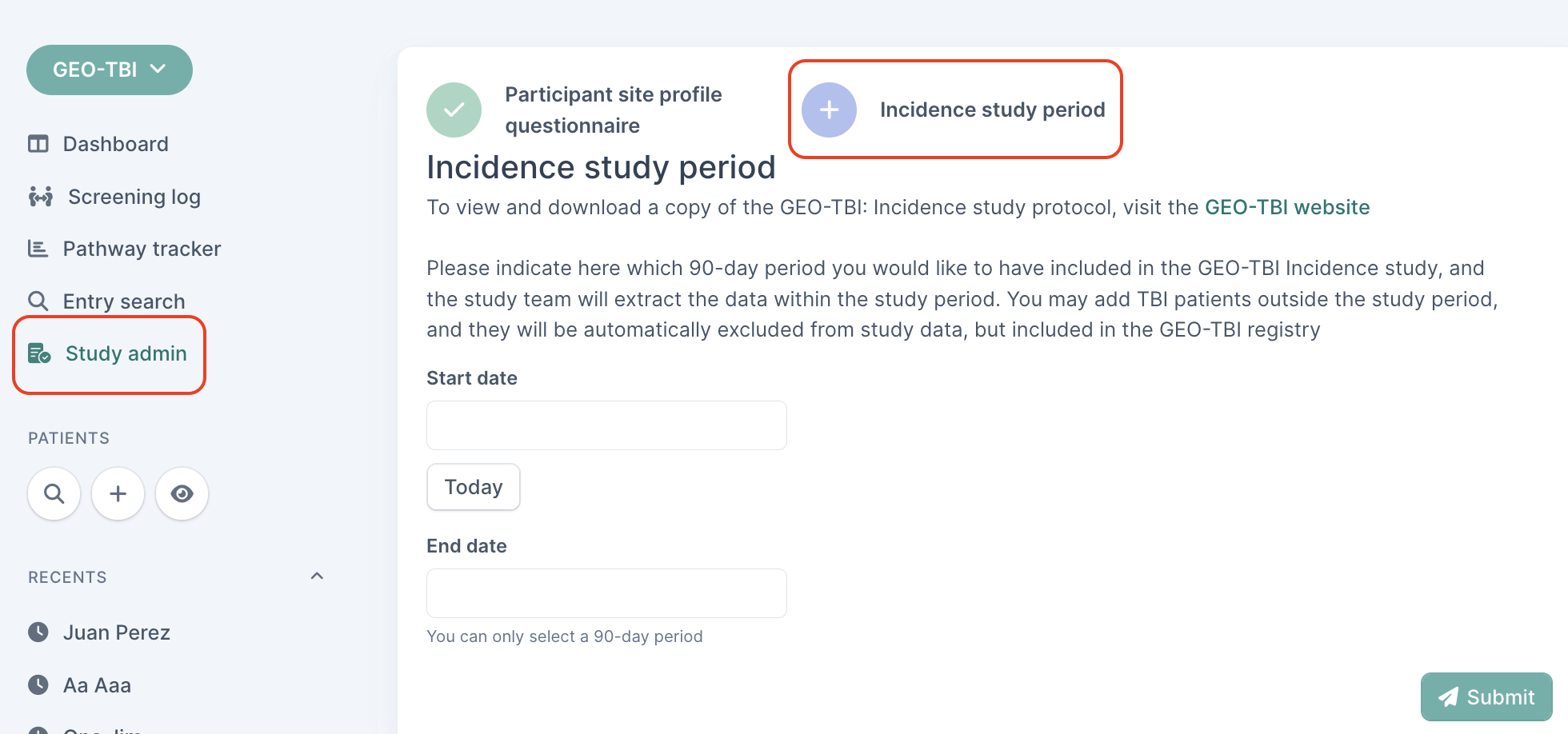
Provided the form is submitted, the central study team will manually extract registry data once the data collection phase closes.
¶ Data integrity
All data fields on each eCRF are mandatory.
Date fields are completed using a date picker tool for convenience.
Once all data fields are complete, click the Submit button; if a data field is not complete, the eCRF will not be submitted and a Required warning will be displayed in red adjacent to the missing data field.
Once an eCRF is successfully submitted, confirmation will be displayed on screen.
If you have any queries with the eCRF please contact Orion support at support@orion.net. Should you wish to view or download the registry protocol, or if you have any registry queries, please visit our dedicated website at www.geotbi.org or email the registry team at geotbi@orion.net.
The Orion platform enables secure online submission, retrieval and sharing of healthcare information across multiple sites in a controlled manner. Orion offers a wide range of healthcare applications from eReferrals to registries and study data collection, accessible via an up-to-date browser. The Orion platform is provided by Orion MedTech Ltd, a not-for-profit Community Interest Company.